Features
Everything a tree company runs on, in one app.
From the first call to the paid invoice, for the owner, the office and every crew.
Leads and estimates
Win more of the jobs you quote
Every call, web request and referral lands in one pipeline, and every estimate goes out looking professional, with options that make the bigger job an easy yes.
Sales pipeline
See every lead from first call to approved estimate, with follow-up reminders so none go cold.
Good / Better / Best
Offer options side by side: remove and leave the wood, haul it away, or grind the stump too.
Your price book
Removals, pruning, stump grinding, cabling and more, with your own prices. Old quotes keep the price you gave.
Photos and tree notes
Attach photos, species, size and condition to each line, so the crew and the customer see the same thing.
Signature on the spot
Customers approve and sign on your phone in the yard, or online from the email you send.
Deposits
Ask for a deposit when the estimate is approved, paid by card before the crew rolls.
Scheduling and dispatch
The right crew and truck, every time
Drag jobs onto the calendar or the dispatch board, see who is free and what each job needs, and let the app warn you before you double-book a bucket truck.
Day, week and month views
See every crew’s schedule at a glance, on the office computer or your phone.
Dispatch board
Assign crews and equipment to jobs, and move them when plans change.
No double booking
Overlapping jobs and missing qualifications are flagged. Overriding needs a reason.
Customer reminders
Customers get a reminder by text or email before the crew arrives.
The crew app
Everything the crew needs, nothing they don’t
Each crew leader and crew member signs in with their own login and sees only their own jobs. Prices, invoices and company finances stay with the office.
On my way, Start, Finish
Three big buttons keep the office and the customer up to date without a phone call.
Job details that matter
Address and directions, gate codes, parking, debris disposal, utility clearance and the work to be done.
Before and after photos
Photos are saved to the job, ready for the customer, the invoice or an insurance claim.
Works offline
Jobs, checklists and photos keep working with no signal, and sync when the phone reconnects.
Gloves and sunlight
Large touch targets, high-contrast text, and type that grows with the phone’s font setting.
English and Spanish
Each person picks their language. The office can stay in English while the crew works in Spanish.
Safety
Safety you can show, not just say
Tree work is dangerous work. Arbor Desk gives your crews the checklists to run a safe job, and gives you the record that they did.
Hazard and PPE checklists
Set your own pre-job briefing: power lines, drop zone, rigging plan and protective gear.
Work-zone records
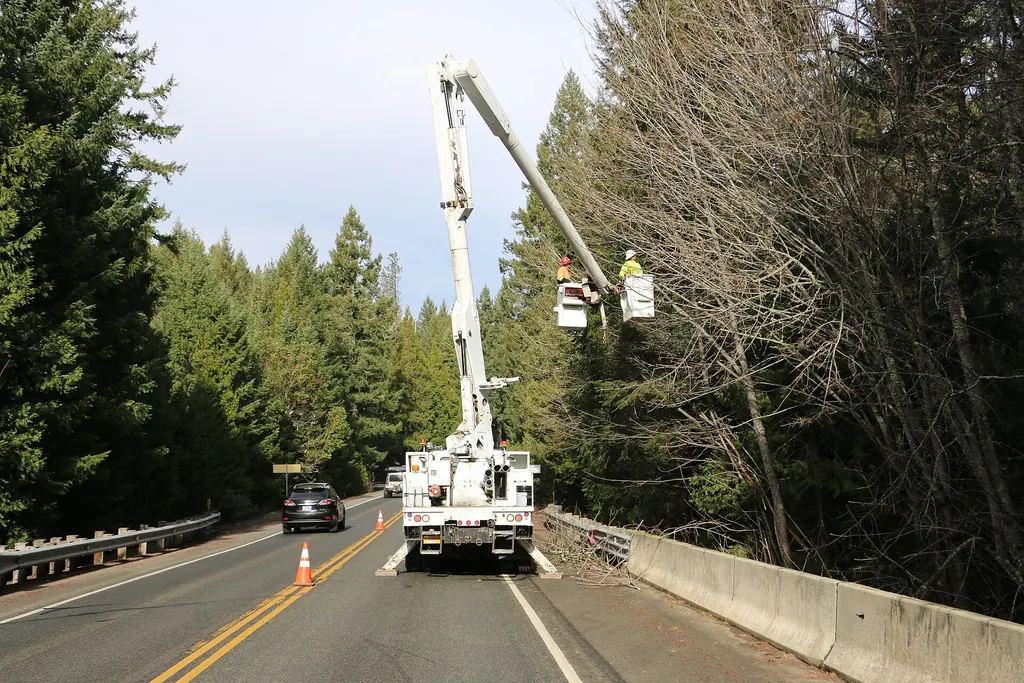
Document cones, signs and traffic control with photos, right on the job.
Equipment inspections
Daily checks for bucket trucks, chippers, grinders and saws, logged by the person who did them.
Incident reports
Record what happened while it’s fresh, with photos, and get a supervisor’s sign-off.
Crew qualifications
Track certifications and their expiry dates, and get a warning before scheduling someone who isn’t qualified.
Weather holds
Pause a job for wind or lightning with a reason, and reschedule without losing track.
Storm response
Ready when the storm hits
When the phones light up after a storm, take the calls fast, sort them by danger, and send crews where they’re needed most.
Emergency intake
A short form for urgent calls: what fell, where, and whether it’s on a house, a car or a line.
Priority dispatch
Emergencies go to the top of the board, ahead of routine work.
Photos for insurance
Before and after photos with the time they were taken, ready for the customer’s claim.
Plant health care
Plant health care and repeat visits
Keep a history for every tree, and bring customers back for the inspections and treatments their trees need.
Tree inventory
Every tree on the property with its species, size, condition, location and photos.
Treatment records
Treatments recorded by your qualified staff, kept with the tree and the property.
Service agreements
Recurring plans for inspections, pruning cycles and treatments, billed on schedule.
Reminders
Repeat inspections and seasonal work come up on time, for you and for the customer.
Invoices and payments
Finish the job, get paid
Invoices come straight from the finished work. Customers pay by card on site or online, and the money goes into your company’s own Stripe account.
Invoices in a tap
Built from the approved estimate and the work the crew finished, with nothing to retype.
Tap to Pay and card readers
Take the card on site. A crew member taking payment sees that one amount due and nothing else.
Online payment
Customers pay from the invoice email or the customer portal.
Customer portal
Customers approve estimates, pay invoices and see their history in one secure place.
QuickBooks Online
Customers, invoices and payments sync to your books.
Know who’s behind
See unpaid and overdue invoices at a glance and send reminders.
The office
Run the business, not the paperwork
Owners, dispatchers, estimators and accountants each get the tools and the access their job needs.
A login and a role for everyone
Admin, dispatcher, estimator, crew leader, crew member and accountant, each seeing what their role allows.
Reports
Sales, jobs, crew hours and revenue, each figure clearly defined and in your own time zone.
Timesheets and job costing
Clock in and out, see labor and equipment cost per job, and export to payroll.
Customer messages
Texts and emails with customers in one shared inbox, so nobody misses a reply.
Two-step verification
Owners and office staff can protect their accounts with an authenticator app.
Audit log
Every change to money, roles and permissions is recorded, with who made it and when.
See it with your own jobs.
Bring a job you quoted last week. We’ll build it in Arbor Desk on the call, from estimate to invoice.